What Local Business Websites Need Above the Fold
The first mobile screen should tell a local visitor what you do, where you do it, why they can trust you, and how to act. Use this checklist before redesigning the whole site.
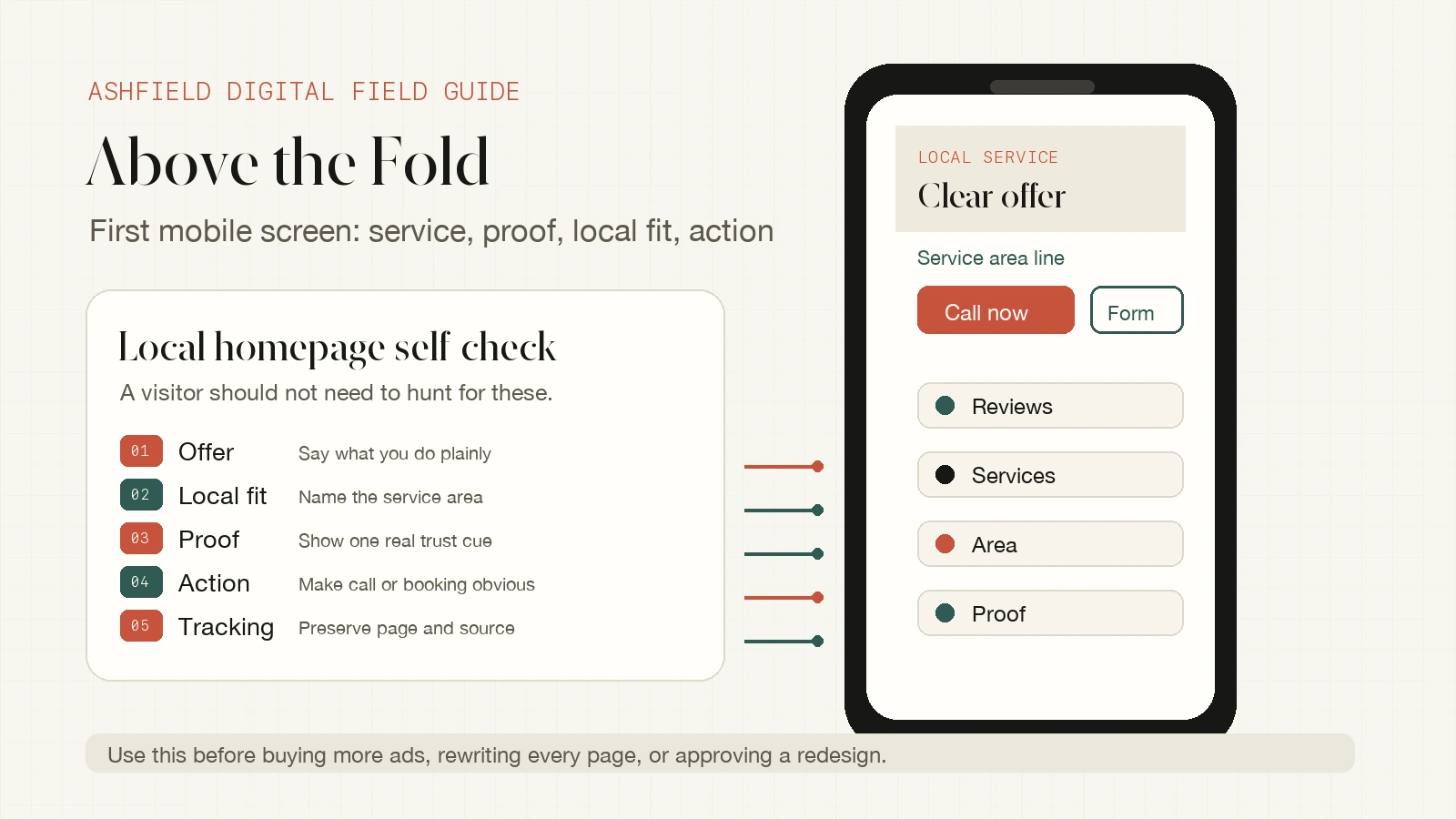
Most local business website problems show up before the visitor scrolls.
A person searches from a phone, taps a result, lands on the site, and gives the business a few seconds to answer four questions: what do you do, do you serve my area, can I trust you, and what should I do next?
If the first screen hides those answers behind a vague headline, a giant photo, a tiny menu, or a buried contact path, more content will not fix the leak. The top of the page needs to carry the first decision.
This is a practical above-the-fold checklist for local business website design. It is not about squeezing every possible element into one crowded hero. It is about making the first mobile view useful enough that a real buyer knows whether to call, book, request an estimate, or keep reading.
Start With The Job Of The First Mobile Screen
"Above the fold" is not one exact pixel line anymore. Phone sizes, browsers, accessibility settings, and sticky bars all change what a visitor sees first. Treat it as the first meaningful mobile screen, not a fixed desktop design rule.
That screen has one job: reduce doubt quickly.
For a local business, the first screen should answer:
- What service, product, or appointment type is this?
- Where does the business operate?
- Why should the visitor trust this business enough to continue?
- What is the safest next action?
- Is there a fast path for urgent or ready-to-act visitors?
Google's mobile-first indexing guidance emphasizes making sure the mobile version contains the same important content and structured data as the desktop version. That matters here because many local websites still look complete on desktop while hiding useful text, links, proof, or contact paths on mobile.
Do not design the top of the page only for a wide monitor. Test the first phone screen, because that is where many local visitors make the first trust decision.
Use A Plain Offer Before A Clever Headline
The headline should not make visitors decode the business.
Weak first-screen copy often sounds polished but vague:
- "Quality you can count on."
- "Your trusted local experts."
- "Solutions built for modern life."
- "Where service meets excellence."
Those lines could describe a roofer, med spa, CPA, contractor, jeweler, law office, or repair shop. They do not help a buyer decide.
A stronger local homepage headline is plain enough to be useful:
- "Residential HVAC repair and replacement in Boca Raton."
- "Custom jewelry repair, resizing, and restoration in Palm Beach County."
- "Emergency plumbing, leak repair, and water heater service in Fort Lauderdale."
- "Website cleanup and local SEO support for service businesses."
The supporting line can add the promise:
| First-screen element | What it should do | Example |
| --- | --- | --- |
| Headline | Name the service and fit | "Mobile car detailing in Delray Beach" |
| Subline | Explain the practical value | "Interior, exterior, and maintenance detailing at your home or office." |
| Service area | Confirm local relevance | "Serving Delray Beach, Boca Raton, Boynton Beach, and nearby areas." |
| Proof | Reduce risk | "4.9 average rating from verified local customers." |
| CTA | Give the next action | "Call now" or "Request an estimate" |
The point is not to remove personality. It is to make clarity arrive before branding language.
Put The Call Or Booking Path Where The Buyer Expects It
Local visitors often arrive with intent. They need a repair, an appointment, a quote, a visit, a consultation, or a store answer. If the first screen makes them open a menu, scroll to the footer, or decode a vague next-step button, the site is adding friction at the wrong moment.
Choose one primary action and one secondary action.
Good primary actions:
- Call now.
- Book appointment.
- Request estimate.
- Get a repair quote.
- Schedule consultation.
Good secondary actions:
- View services.
- See service areas.
- Check pricing.
- View project examples.
- Read reviews.
Avoid making three or four buttons compete. If the business wins most leads by phone, make the phone path dominant. If the business needs project details first, make the estimate form dominant. If the buyer needs to choose a service, make the service path obvious and keep the phone button visible.
Then test the actual mobile tap path:
1. Tap the phone button and confirm it opens the right number.
2. Tap the booking button and confirm the first available action is obvious.
3. Submit a test form from a tagged URL.
4. Confirm the lead notification includes page, form, and source context when available.
5. Check that the sticky mobile CTA does not cover the form, chat, cookie banner, or review widget.
A visible button is not enough. The path has to work after the tap.
Move Real Proof Near The Top
Local business websites often bury proof in a gallery, testimonial carousel, or separate reviews page. That forces the visitor to trust the business before seeing why they should.
Use a small proof block near the top instead.
Useful proof can include:
- Review rating and count when accurate and current.
- "Licensed and insured" when true and relevant.
- Years in business when it genuinely matters.
- Named service areas.
- A short project type or specialty.
- Before-and-after example link.
- Same-day, emergency, or appointment availability when real.
- Recognizable certification, warranty, or process note.
- Local address or showroom cue when visits matter.
Keep proof factual. Google's people-first content guidance pushes creators to make content for people rather than search engines, and that applies to local proof too. A visitor needs evidence they can use, not a padded claim written for a keyword.
Bad proof sounds like this:
- "The best service in South Florida."
- "Thousands of happy clients."
- "Award-winning team."
- "Guaranteed results."
Better proof sounds like this:
- "Serving Palm Beach County homeowners since 2014."
- "Licensed HVAC contractor. Emergency repair available."
- "See recent kitchen cabinet refinishing projects in Boca Raton."
- "Call, text, or request a written estimate before scheduling."
Specific proof makes the page more useful for buyers and easier for search systems to understand because the visible facts are clear.
Show Local Context Without City-Name Stuffing
Local context should help the buyer decide whether the business is a fit. It should not read like a list of cities pasted into a paragraph.
Good local context answers practical questions:
- Do you serve my city or neighborhood?
- Do you come to me, or do I visit you?
- Is this emergency, appointment-only, showroom, delivery, or service-area work?
- Are there different services by location?
- Is there a map, address, or parking detail I need?
For a mobile first screen, one concise line is often enough:
"Serving Boca Raton, Delray Beach, Deerfield Beach, and nearby Palm Beach County communities."
Or:
"Visit our West Palm Beach showroom or book an in-home measurement."
Or:
"Remote website cleanup for local service businesses across the United States."
If the business has multiple locations, the first screen should route people quickly: choose location, call the nearest office, or view service areas. If the business has one location, make the address or service area easy to confirm.
Do not turn local SEO into doorway-style copy. A page should be useful to a person in that place, not just swapped with another city name.
Keep Important Text Crawlable And Visible
Some local homepages look beautiful but hide their useful content inside images, sliders, videos, or scripts. That can hurt both visitors and search understanding.
The first screen should include real HTML text for the core offer, service area, and action path. Important business facts should not live only inside an image. Image text can support the design, but it should not be the only place the visitor or search system can find the service promise.
Check the page this way:
- Can you copy and paste the headline and service-area line?
- Does the mobile version show the same important offer as desktop?
- Are buttons real links or form actions, not only visual elements?
- Does the page still make sense if a hero video does not load?
- Does the image alt text describe the image without stuffing keywords?
- Does structured data match facts visible on the page?
Google's structured data guidelines require markup to describe page content accurately. For a local business, that means the page should not claim hidden services, fake reviews, unsupported locations, or business details that the visitor cannot verify on the page.
The search-friendly version is also the buyer-friendly version: clear visible text, accurate facts, useful links, and no hidden promises.
Run A 10-Minute Above-The-Fold Self-Check
Open the homepage or service page on a phone and do this before changing the whole site:
| Check | Passes if | Fix first if |
| --- | --- | --- |
| Service clarity | A stranger can name what you do in five seconds. | The headline is vague or image-only. |
| Local fit | The visitor can tell whether you serve them. | City, service area, address, or appointment context is missing. |
| Primary action | One next step is visually dominant. | The only visible action is vague or noncommittal. |
| Phone or booking | Ready buyers can act from the first screen. | Contact details are hidden in the menu or footer. |
| Proof | One real trust signal is visible. | Reviews, credentials, projects, or local proof appear only far below. |
| Mobile usability | Buttons are tappable and do not overlap. | Sticky bars, chat, banners, or menus cover the CTA. |
| Tracking | Test leads preserve page/source context. | Forms or calls arrive with no useful source details. |
If three or more rows fail, the issue is not just design taste. The page is asking local visitors to work too hard before they trust the business.
When A Cleanup Sprint Is Enough
Not every weak first screen needs a full redesign.
A focused cleanup sprint is often enough when:
- The site platform is stable.
- The brand is acceptable.
- The main services are already known.
- The homepage and service pages exist.
- The top section is vague, crowded, or poorly ordered.
- The call, booking, or form path needs repair.
- Local proof exists but is buried.
- Tracking fields need to be preserved.
A redesign makes more sense when the content structure is wrong, the site is hard to edit, the visual system is dated across every page, the platform is limiting, or the business has changed enough that the whole message needs rebuilding.
The smaller useful fix is usually the right first move. Repair the first-screen offer, proof, action path, and tracking before buying more ads, publishing more local pages, or approving a full redesign.
Ashfield's Local Website Cleanup Path
Ashfield helps local businesses and agency teams turn vague local websites into clearer, more useful pages.
The practical path is:
- Use `/solutions/local-business-websites` when the homepage, service pages, and trust signals need clearer structure.
- Use `/solutions/website-local-seo-cleanup-sprint` when the mobile call path, local service context, and page cleanup need focused implementation.
- Use `/audit` when you need proof of where the page is leaking trust or leads before choosing the scope.
- Use `/solutions/conversion-tracking-lead-attribution` when calls and forms work visually but lose source context after the inquiry.
- Use `/contact` when the next step is a scoped cleanup instead of another broad redesign conversation.
The goal is simple: the first mobile screen should help a local visitor understand the business, trust the next step, and act without hunting.
Sources Used For This Local Website Checklist
- Google Search Central: Mobile-first indexing best practices: https://developers.google.com/search/docs/crawling-indexing/mobile/mobile-sites-mobile-first-indexing
- Google Search Central: Creating helpful, reliable, people-first content: https://developers.google.com/search/docs/fundamentals/creating-helpful-content
- Google Search Central: General structured data guidelines: https://developers.google.com/search/docs/appearance/structured-data/sd-policies
- Google Business Profile Help: Guidelines for representing your business on Google: https://support.google.com/business/answer/3038177
FAQ
What should be above the fold on a local business website?
The first mobile screen should show the business type, service or offer, service area, strongest proof, and a clear next action such as call, book, request an estimate, or view services. It should avoid vague slogans, oversized images, and hidden contact paths that make visitors scroll before understanding whether the business can help.
Should a phone number or booking button appear above the fold?
Usually yes, especially for local service businesses, clinics, shops, and appointment-driven companies. The primary action should match how customers actually buy: tap to call for urgent or consultative work, book now for appointment-led services, request an estimate for scoped projects, or view services when the visitor needs more context first.
What trust signals belong near the top of a local homepage?
Use trust signals that a real visitor can verify quickly: review rating or review count when accurate, years in business, licensed or insured status when relevant, named service area, recognizable project type, before-and-after proof, appointment expectations, or a clear local address. Do not invent testimonials, badges, awards, or statistics.
How much local context should the first screen include?
Enough to confirm fit. A visitor should know whether the business serves their area, handles their service type, and understands the local need. That can be a short service-area line, city or neighborhood reference, map-adjacent cue, or link to service-area pages. Avoid stuffing city names into copy that does not help the buyer decide.
When is a cleanup sprint enough instead of a full redesign?
A cleanup sprint is often enough when the brand, platform, and main pages are usable but the first screen is vague, the call path is buried, proof is too low on the page, tracking is weak, or service-area context is missing. A redesign makes more sense when the structure, visual system, content, platform, and conversion paths all need rebuilding.
Keep reading
What Fail-Closed QA Means Before a Local Post Goes Live
AI and content calendars make it cheap to ship local posts. Fail-closed QA is the opposite habit: named checks that block publish when the copy would misrepresent a shop, pad a suburb, skip the call path, or invent a fact.
What Actually Moves Calls for Multi-Location Home Services (Maps, Pages, Conversion)
If call volume is flat, more blog posts are usually the wrong first move. Inspect the Maps listing a buyer actually sees, the location or service page they land on, and the tap-to-call or form path that has to finish the job.
How Multi-Location Home Service Brands Keep City Pages Distinct
A city-page farm can look like coverage while giving buyers the same thin answer in ten URLs. Use this method to approve only the markets that differ, publish what must be distinct, and keep those pages current on a weekly cadence.