How to Turn a Technical SEO Audit Into Shipped Fixes
A technical SEO audit only creates value when fixes ship. Assign owners, criteria, validation, and handoff notes.
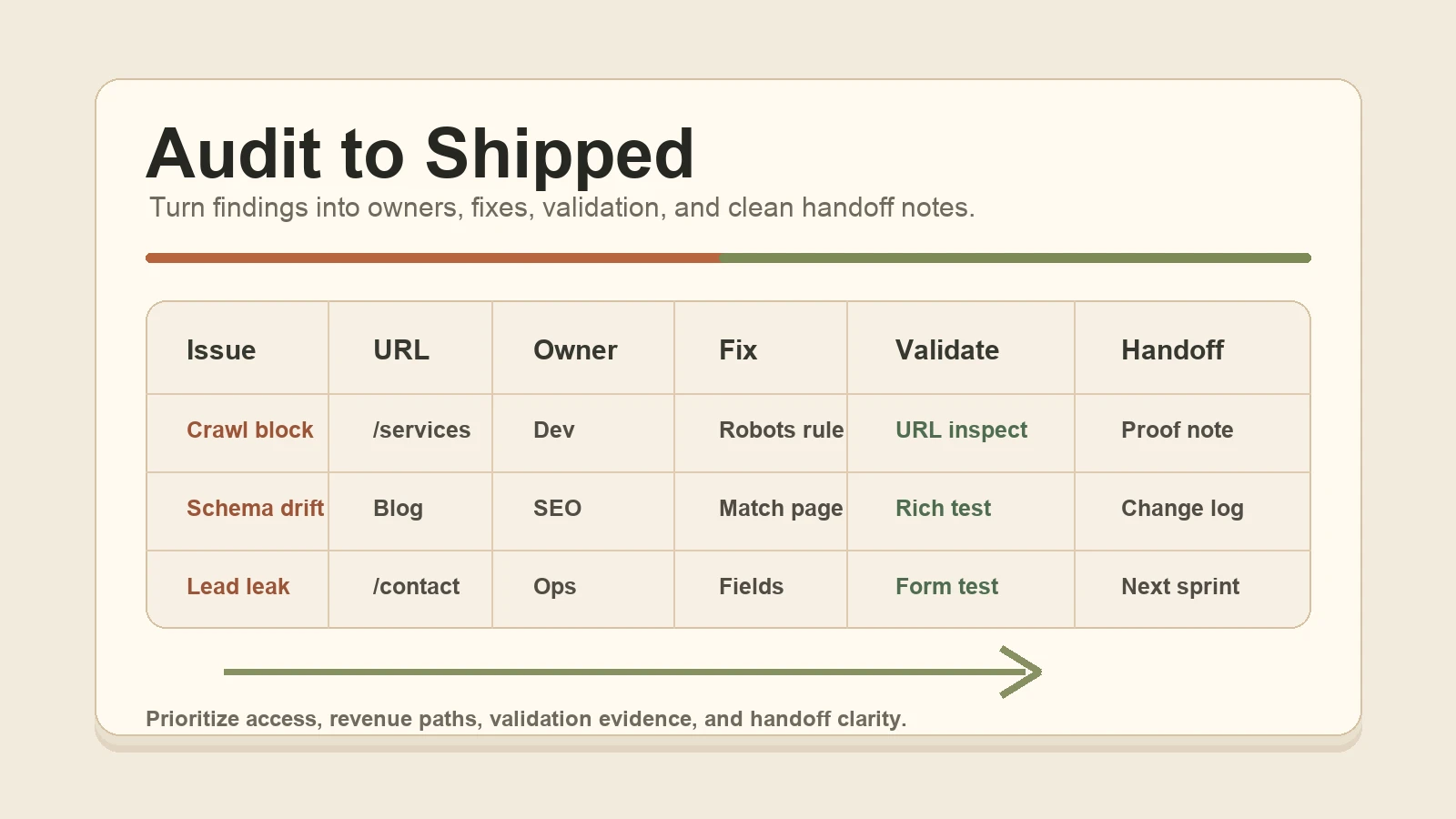
A technical SEO audit is useful only when it becomes shipped work. The spreadsheet can be accurate, the screenshots can be clear, and the severity labels can be reasonable, but none of that fixes crawl waste, broken canonicals, missing schema, weak internal links, or lead paths that never get tested.
The practical decision is not "do we have an audit?" It is: which findings should ship first, who owns each fix, what counts as done, and how will the team prove the page is better after deployment?
That is the difference between an audit deliverable and shipped SEO work. One names problems. The other turns problems into a prioritized queue with owners, acceptance criteria, validation steps, and handoff notes that a business or agency can actually use.
Start By Turning Findings Into An Implementation Tracker
Most audits stall because the findings are written for diagnosis, not execution. A good audit may say "canonical conflict on service pages" or "FAQ schema errors on blog templates." A useful implementation tracker turns that into work someone can ship.
At minimum, each row should include:
- Issue: the specific problem, not a broad category.
- Affected URL or template: the exact page, page type, or pattern.
- Business risk: why this matters to crawl access, indexability, leads, reporting, or buyer trust.
- Owner: the person or team responsible for the change.
- Fix: the implementation action in plain language.
- Acceptance criteria: what must be true before the ticket is complete.
- Validation method: how the fix will be tested.
- Handoff note: what changed, what remains, and where proof lives.
Here is a simple example:
| Issue | URL | Owner | Fix | Validate | Handoff note |
| --- | --- | --- | --- | --- | --- |
| Canonical points to old service URL | `/solutions/technical-seo-services` | Developer | Update canonical to the live URL and confirm sitemap uses same URL | View source, crawl, Search Console URL Inspection | Canonical and sitemap now agree; submit for recrawl after deploy |
| FAQ schema does not match visible FAQ | Blog template | SEO + Developer | Remove hidden FAQ item and align JSON-LD with page content | Rich Results Test and page review | Schema now mirrors visible FAQ copy |
| Lead form drops landing page field | Contact form | Developer + Ops | Preserve landing page and current page in hidden fields | Test form submission and CRM/email output | Source context appears in lead notification |
That format changes the conversation. Instead of debating whether a warning is "important," the team can see what gets fixed, who is responsible, and what proof will close the loop.
Ship The Findings Closest To Access And Revenue First
Technical SEO priority should follow risk, not just tool severity. A "critical" issue on a page nobody needs may matter less than a "warning" on the service page that creates qualified inquiries.
Start with issues that affect whether important pages can be found, crawled, indexed, understood, and acted on:
- Robots.txt blocks or noindex tags on pages that should appear in search.
- Canonical tags that point important URLs to the wrong page.
- Redirect chains, loops, or old URLs that waste crawl paths or confuse users.
- Broken internal links to core service, pricing, audit, or contact pages.
- Important pages missing from the sitemap or orphaned from normal navigation.
- Structured data errors that misrepresent visible page content.
- Mobile rendering issues that hide primary content or action paths.
- Forms, phone paths, or tracking fields that lose source context after a visitor acts.
Then look for template-level fixes. If one blog template problem affects 80 resources, or one service-page component creates bad internal links across the site, that should move up the queue. A template fix can clean up a whole section at once.
Lower-priority work can still matter, but it should not crowd out access and revenue-path fixes. Rewriting every title tag before fixing a bad noindex rule is how audits become busywork.
Define Acceptance Criteria Before Anyone Starts
Acceptance criteria prevent the classic "fixed on my end" problem. They make the definition of done visible before the developer, SEO lead, owner, or agency partner starts work.
Good acceptance criteria are specific enough to test:
- The live service page returns a `200` status code and is not blocked by robots.txt.
- The page does not include a `noindex` directive.
- The canonical URL points to the live preferred URL.
- The sitemap includes only the indexable preferred URL.
- Internal links from related resources point to the preferred URL.
- FAQ schema matches the visible FAQ content on the page.
- The contact form notification includes landing page, current page, and UTM fields when available.
- Search Console URL Inspection can fetch the live URL after deployment.
Weak acceptance criteria sound like "clean up schema" or "fix crawl errors." Those phrases may be fine in the audit summary, but they are not enough for implementation. A person doing the work needs to know what to change. A person reviewing the work needs to know what evidence closes the ticket.
This is also where agency handoffs get safer. If an agency needs overflow implementation, the account team can keep strategy and client communication while an implementation partner ships against clear criteria. Nobody has to guess what "done" means.
Verify Crawl And Index Fixes With More Than One Signal
Google's own description of Search breaks the process into crawling, indexing, and serving. Not every page makes it through each stage, and Google does not guarantee that a page will be crawled, indexed, or served even when it follows the essentials. That makes validation important.
For crawl and index fixes, use a small evidence stack instead of trusting one tool:
- Live page check: the URL loads, returns the expected status, and shows the intended content.
- Robots review: robots.txt is not blocking the URL path.
- Page directives: meta robots and HTTP headers do not accidentally noindex the page.
- Canonical review: the canonical points to the preferred live URL.
- Redirect test: old URLs resolve cleanly without loops or unnecessary chains.
- Internal link check: important pages can be reached from navigation, service pages, resources, or related content.
- Sitemap review: indexable preferred URLs are included, and removed URLs are not.
- Search Console: inspect the URL, test the live page, and request validation or recrawling where appropriate.
That sounds like more work than changing a tag, because it is. But it is also the difference between a code change and a shipped SEO fix. The validation note is what lets the owner understand that the page is now reachable, internally supported, and ready for search systems to process.
Treat Schema As A Page-Truth Check
Structured data is useful when it helps search systems understand content that is already visible and accurate. It becomes risky when it says more than the page says.
Google's structured data guidelines are direct about this: markup should represent the page content, avoid misleading claims, and not describe hidden or irrelevant content. Image URLs used in structured data should also be crawlable and relevant to the page.
For schema cleanup, check:
- Does the structured data type fit the page?
- Do the title, description, author, date, image, and URL match the visible page?
- If FAQ schema is present, are the same questions and answers visible to readers?
- Are reviews, prices, ratings, offers, services, or locations claimed only when the page supports them?
- Are images crawlable and relevant?
- Does the Rich Results Test return critical errors?
- Does the page still help the reader if the markup were removed?
That last question is the operator test. Schema should confirm page truth. It should not compensate for thin copy, missing proof, hidden answers, fake reviews, or vague service claims.
Document Before And After Evidence
Good implementation leaves a trail. Not a giant report, just enough evidence for the next person to see what changed and why it mattered.
Useful before-and-after notes include:
- Before: screenshot or crawl export showing the issue.
- Change: plain-language summary of the fix.
- After: screenshot, test result, crawl result, Search Console note, or form test showing the current state.
- Limitation: anything still waiting on deployment, recrawl, platform access, or client approval.
- Owner: who can answer follow-up questions.
- Date: when the fix shipped and when it should be checked again.
For example:
> Before: `/audit` linked to an old technical SEO page from three blog posts.
> Change: updated internal links to `/solutions/technical-seo-services`.
> After: crawl confirms the old path no longer appears in those posts; service page receives internal links from the audit and resources cluster.
> Follow-up: monitor Search Console impressions and internal clicks after recrawl.
That note is not glamorous. It is useful. It lets an owner see progress, lets an agency explain delivery, and gives future QA a place to start.
Use The Handoff To Keep Work Moving
The handoff is where implementation either keeps momentum or falls back into another meeting. A clear handoff should tell the business what shipped, what did not, what needs approval, and what should happen next.
A concise handoff can include:
- Shipped this week: the fixes that deployed.
- Validated: the checks that passed.
- Waiting: items blocked by access, content approval, platform limits, or deployment windows.
- Watch next: pages or reports to monitor after recrawl.
- Next sprint: the next small batch of high-risk fixes.
This matters for owners and agencies. Owners need to know whether the audit is becoming working website improvement. Agencies need a clean client-facing note that does not bury them in technical noise. Implementation partners need enough context to ship the next batch without reopening old decisions.
For Ashfield, the best handoff is calm and specific: "These five fixes shipped. Here is the evidence. These two are blocked by access. Here is the next batch." That beats a 40-page audit update every time.
Ashfield's Technical SEO Implementation Path
Ashfield's role is to turn technical SEO findings into working changes on the site. That can mean direct implementation for an owner or overflow support for an agency that already has approved recommendations but not enough production capacity.
The action path is straightforward:
- Start with `/audit` if the site needs a prioritized fix list before work begins.
- Use `/solutions/technical-seo-services` when the problem is crawl access, indexability, schema cleanup, redirects, internal links, performance cleanup, or implementation backlog.
- Use `/solutions/agency-fulfillment-partner` when an agency needs senior overflow to ship approved technical work without hiring.
- Use `/solutions/conversion-tracking-lead-attribution` when the website creates leads but loses source, page, or campaign context.
- Use `/contact` when the priority is no longer another report. It is getting the fixes shipped.
The goal is not to make the audit look bigger. It is to make the queue smaller, the pages cleaner, and the next action obvious.
Sources Used For This Implementation Standard
- Google Search Central: In-depth guide to how Google Search works: https://developers.google.com/search/docs/fundamentals/how-search-works
- Google Search Central: Overview of crawling and indexing topics: https://developers.google.com/search/docs/crawling-indexing
- Google Search Central: General structured data guidelines: https://developers.google.com/search/docs/appearance/structured-data/sd-policies
- Google Search Central: Get started with Search Console: https://developers.google.com/search/docs/monitor-debug/search-console-start
FAQ
Which technical SEO audit findings should ship first?
Start with findings that block crawling, indexing, rendering, key service pages, lead paths, or structured data accuracy. Then prioritize fixes that affect important templates or many URLs. Cosmetic recommendations, minor metadata changes, and low-impact warnings can wait until the high-risk access and revenue-path issues are resolved.
How do you verify crawl and index fixes?
Use a combination of Search Console URL Inspection, coverage or indexing reports, live page checks, crawls, robots.txt review, canonical checks, sitemap review, redirect tests, and server response validation. The fix is not complete just because a ticket moved to done; it needs evidence that search engines and users can reach the intended page.
When does schema cleanup help an implementation queue?
Schema helps when it accurately describes visible page content, supports an eligible rich result type, and removes ambiguity for search systems. It does not rescue thin content or misleading pages. Validate structured data, make sure image URLs are crawlable, and avoid marking up reviews, FAQs, services, or offers that are not visible to readers.
What should be documented for a technical SEO handoff?
Document the issue, affected URLs, why it matters, owner, exact fix, acceptance criteria, validation method, before-and-after evidence, deployment date, and any remaining limitation. A good handoff lets an owner, developer, agency, or future QA reviewer understand what changed without reopening the entire audit.
What can Ashfield implement from a technical SEO audit?
Ashfield can help turn audit findings into shipped work: crawl and index cleanup, schema updates, internal links, page-template fixes, redirects, performance cleanup, analytics and conversion tracking checks, and agency overflow implementation. The useful starting point is a prioritized fix list tied to business-critical pages.
Keep reading
What Fail-Closed QA Means Before a Local Post Goes Live
AI and content calendars make it cheap to ship local posts. Fail-closed QA is the opposite habit: named checks that block publish when the copy would misrepresent a shop, pad a suburb, skip the call path, or invent a fact.
What Actually Moves Calls for Multi-Location Home Services (Maps, Pages, Conversion)
If call volume is flat, more blog posts are usually the wrong first move. Inspect the Maps listing a buyer actually sees, the location or service page they land on, and the tap-to-call or form path that has to finish the job.
How Multi-Location Home Service Brands Keep City Pages Distinct
A city-page farm can look like coverage while giving buyers the same thin answer in ten URLs. Use this method to approve only the markets that differ, publish what must be distinct, and keep those pages current on a weekly cadence.